

How to Remove Malware from Android: An Easy Guide to Clean Your Phone
Quick answer: how to remove malware from android
Yes, you can remove malware from your Android phone at home, and it is easy with Safe Mode and Play Protect. To learn how to remove malware from android the easy way, restart your phone in Safe Mode, delete apps you do not trust, run a Play Protect scan, and clear your browser data. The full guide below shows you how to remove malware from android step by step, so your phone is clean and fast again.
How Do You Know Your Android Phone Has Malware?
Malware on Android is almost always a bad app. Here are the signs that your phone may have malware.
- Pop up ads appear all the time, even on your home screen
- Your battery drains fast, even when you do not use the phone
- Your data use is very high, even when you are on WiFi
- Apps you do not know appear on your phone
- Your phone is very slow, even for simple tasks
- Your browser home page changed without you doing it
If you see two or more of these signs, it is time to learn how to remove malware from android on your phone. That is why it pays to know how to remove malware from android before your phone slows down. For more easy tech guides, browse our Tech and Computers tips.
What Do You Need?
You do not need special tools to learn how to remove malware from android. Here is the full list.
- Your Android phone, charged up
- Google Play Protect, which is built into your phone
- Your Google account password, in case you need it
- A backup of your photos, if you can make one
- A few minutes of time
That is all you need to learn how to remove malware from android at home.
How to Remove Malware from Android in 7 Easy Steps
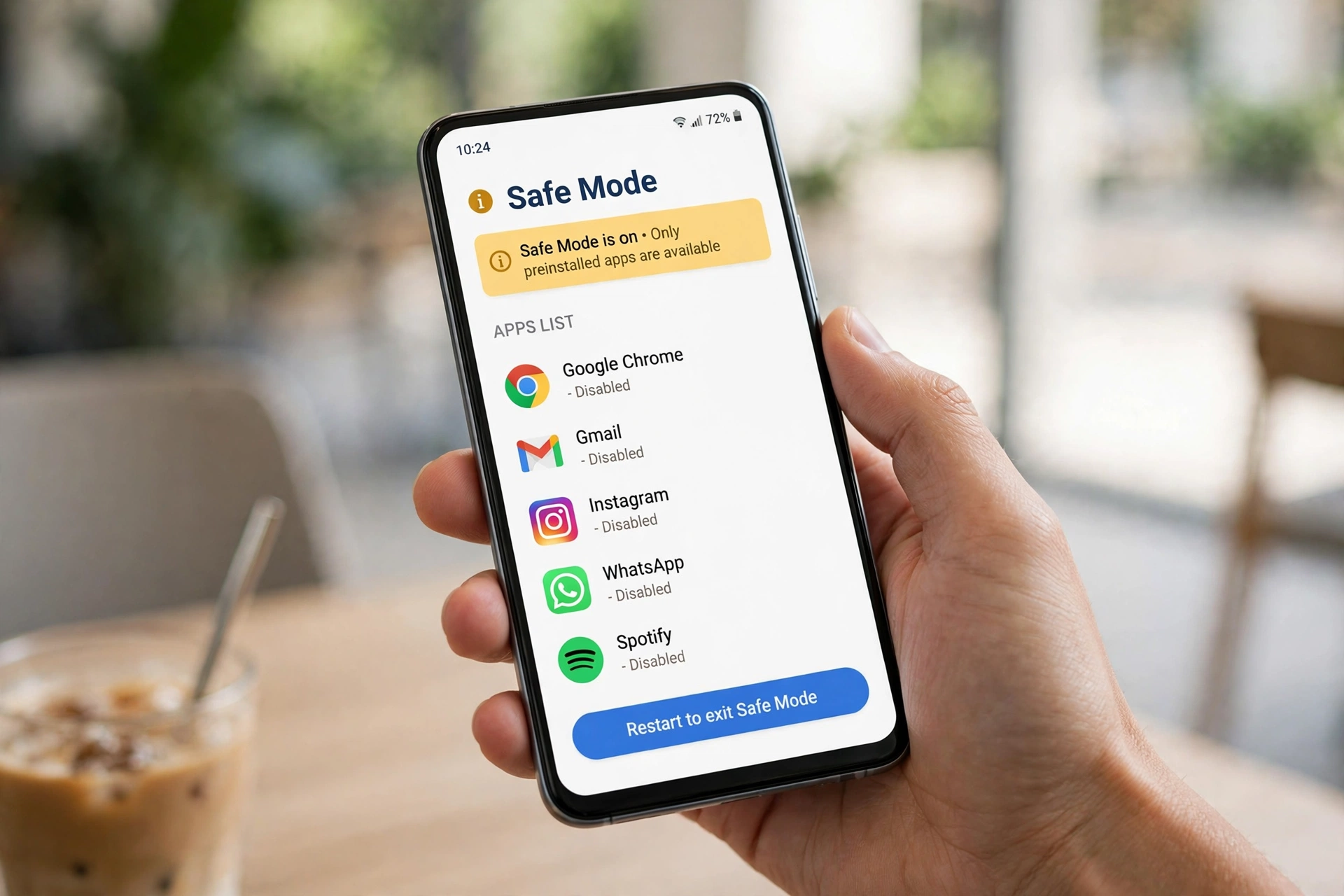
This is the full method for how to remove malware from android. Read the steps once, then start.
Step 1: Restart Your Phone in Safe Mode
Safe Mode stops all third party apps, so the malware cannot run and hide. Press and hold the power button, then press and hold Power off until you see Reboot to safe mode, and tap OK. Your phone will restart in Safe Mode, and you will see “Safe mode” at the bottom of the screen. Starting in Safe Mode is the first step in how to remove malware from android safely.
Step 2: Find and Delete Bad Apps
Go to Settings, then Apps, and look for apps you do not know, apps you never installed, or apps with strange names. Tap the app, then tap Uninstall. If the Uninstall button is grey, the app may have device admin rights. Go to Settings, then Security, then Device admin apps, turn off the app, then go back and uninstall it. Deleting bad apps is the key step in how to remove malware from android phone for good. That step is how to remove malware from android the fast way.
Step 3: Run a Play Protect Scan

Open the Google Play Store, tap your profile icon, then tap Play Protect, then tap Scan. Play Protect will check all your apps for threats. If it finds a bad app, tap Remove. Play Protect is free and built into every Android phone, so use it often. A Play Protect scan is a key part of how to remove malware from android device safely. Avast’s guide to removing a virus from an Android phone covers the same Safe Mode, Play Protect, and factory reset steps.
Step 4: Clear Your Browser Data
Bad ads often come from your browser. Open Chrome, tap the three dots, then Settings, then Privacy and security, then Clear browsing data. Tick Cookies and site data and Cached images and files, then tap Clear data. This stops pop up ads from bad websites. Clearing your browser is a key part of how to remove malware from android phone when ads keep coming back.
Step 5: Turn Off Bad Notifications
Some malware sends fake notifications that look like system warnings. Go to Settings, then Notifications, then App notifications, and turn off notifications for apps you do not trust. Also check Chrome: open Chrome, tap the three dots, then Settings, then Site settings, then Notifications, and block sites you do not know. Turning off bad notifications is a smart step in how to remove malware from android well.
Step 6: Update Your Phone and Apps
Go to Settings, then System, then System update, and install any update you see. Updates fix security holes that malware uses to get in. Then open the Play Store, tap your profile icon, then Manage apps and device, and update all your apps. Updating is a key part of how to remove malware from android for good.
Step 7: Restart in Normal Mode and Test
Restart your phone in normal mode by pressing and holding the power button and tapping Restart. Test your phone for a day: check if the pop up ads are gone, if the battery lasts longer, and if the phone is fast again. If the phone is clean, you are done. These small steps are the last step in how to remove malware from android from start to finish.
How to Stop Pop Up Ads on Android

Pop up ads are the most common sign of Android malware. Here is how to stop pop out ads on your phone.
- Restart your phone in Safe Mode and delete any app you do not trust.
- Run a Play Protect scan and remove what it finds.
- Clear your Chrome data: open Chrome, go to Settings, then Privacy and security, then Clear browsing data.
- Block bad sites: open Chrome, go to Settings, then Site settings, then Notifications, and block sites you do not know.
- Turn off pop ups: open Chrome, go to Settings, then Site settings, then Pop ups and redirects, and turn it off.
That is how to stop pop out ads on Android. If you wonder how do I stop the ads on my phone, these steps are the answer, because most pop up ads come from a bad app or a bad website. If you want to know how to remove malware from my android phone that shows ads all day, start with Safe Mode and delete the bad app. If the ads keep coming after this, back up your photos and do a factory reset. If you want to know how to delete pop up ads for good, delete the bad app that makes them, because blocking the ads alone does not remove the app.
How to Get Rid of Virus on Android
A virus on Android is almost always a bad app. Here is how to get rid of virus on android.
- Restart your phone in Safe Mode.
- Delete apps you do not trust, and turn off device admin rights first if you need to.
- Run a Play Protect scan and remove what it finds.
- Clear your browser data and block bad sites.
- Update your phone and all your apps.
- Restart in normal mode and test your phone.
That is how to get rid of virus on android. Knowing how to remove malware from android is the best way to keep your phone safe from viruses. If you wonder how to get rid of virus on phone when it is an Android, these steps are the answer. If the phone is still slow after this, back up your photos and do a factory reset. If you want to know how to remove a malware from android that keeps coming back, a factory reset is the last step, because it wipes the phone clean.
Best Apps to Remove Malware from Android: What to Use and What to Avoid
The best app to remove malware from Android is one you trust. Here is what to use and what to avoid.
Use: – Google Play Protect, which is free and built into your phone – Malwarebytes for Android, for a strong second scan – Your phone maker security app, like Samsung Device Care – A strong screen lock and two factor auth, for all your accounts
Avoid: – Free cleaner apps from ads or pop ups, which can be malware themselves – Paying for an app from a scary pop up that says your phone is infected – Downloading apps from outside the Play Store – Clicking links in strange texts or emails – Ignoring updates, which fix security holes
If you are not sure about an app, check the Play Store reviews and the maker website first. That check is a smart step in how to remove malware from android with the right tools. The best malware removal plan is simple: Play Protect, a second scan, and safe habits every day. That plan is how to remove malware from android the right way.
Mistakes to Avoid When You Remove Malware from Android
Many people make these mistakes when they learn how to remove malware from android. Avoid them and your phone will stay safe. That is the simplest way to learn how to remove malware from android well.
- Clicking a pop up that says your phone is infected, which can install more malware
- Downloading a random cleaner app from an ad
- Skipping Safe Mode, which lets the malware hide from the scan
- Forgetting to turn off device admin rights before you delete a bad app
- Not updating your phone after the clean up
- Thinking one scan is enough, when a second scan is safer
How to Remove Malware from Android: Quick Checklist
Use this checklist every time you clean your phone.
- Restart your phone in Safe Mode.
- Delete apps you do not trust.
- Run a Play Protect scan and remove what it finds.
- Clear your browser data and block bad sites.
- Turn off bad notifications.
- Update your phone and all your apps.
- Restart in normal mode and test your phone.
Frequently Asked Questions
How do I check for viruses on Android?
Run a Google Play Protect scan from the Play Store, or use a trusted antivirus app from the Play Store. An android virus scan will check your apps and files for threats. Also check your battery and data use, because malware often drains both.
How do I remove malware from my Android phone?
Restart your phone in Safe Mode, delete apps you do not trust, run a Play Protect scan, and clear your browser data. These steps fix most Android malware. If the phone is still slow after this, back up your photos and do a factory reset.
How do I stop pop up ads on Android?
Delete the bad app that makes the ads, run a Play Protect scan, clear your Chrome data, and block bad sites in Chrome settings. If you only block the ads without deleting the app, the ads will come back.
Can Android get a virus?
Yes, Android phones can get malware, mostly from bad apps downloaded outside the Play Store or from fake links. Real viruses are rare, but bad apps are common. Keep your phone updated, download apps only from the Play Store, and run Play Protect scans often.
Will a factory reset remove malware from Android?
Yes, a factory reset removes almost all malware from Android, because it wipes the phone and puts it back to factory settings. Back up your photos and files first, because a factory reset erases everything. Use it only when a scan does not fix the problem.
How did my Android phone get malware?
Android malware often comes from a bad app, a fake link in a text or email, a pop up ad, or an app downloaded outside the Play Store. To stay safe, download apps only from the Play Store, do not click strange links, and keep your phone updated.
Related Guides You May Like
If you liked this guide, try these easy guides from Daily Life Hacks. Learn how to remove malware to clean any device, see how to reset router to fix slow WiFi, read how to format a usb drive to clean up your drive, check how to remove duplicates in Excel to keep your data clean, and see how to clean a whiteboard when your board gets stained. You can also read how to polish shoes for a mirror shine on leather, learn how to clean dishwasher filter to keep your dishwasher working well, and see how to wash pillows to keep your bed fresh. Also read how to get water out of your ear, how to stop coughing, how long does a root canal take, how much caffeine is too much, how to learn spanish fast, how to learn japanese, how to learn a new language, how to calculate gpa, how long have humans been on earth, how to practice spanish speaking, how to learn photography, how many states of united states, how many steps in a mile, how to make cold foam, why is my husband yelling at me, and what is a duvet cover. Also read how to fix printer streaks, how to iron a shirt, how to clean a blender, and how to reduce ping. Also read how to make tea, how to remove a splinter, how to clean a hairbrush, and my wife is yelling at me. Also read how many miles is a 5k. You can also browse all our Tech and Computers tips for more simple guides.
Final Thoughts
Learning how to remove malware from android is easy once you know the golden rule: Safe Mode, delete bad apps, and run a Play Protect scan. Clear your browser data, block bad sites, update your phone, and test it. That is all it takes. Now that you know how to remove malware from android the easy way, your phone will stay clean and fast. Share this guide with a friend whose phone shows pop up ads, because everyone needs to know how to remove malware from android. Just remember to download apps only from the Play Store, do not click strange links, and keep your phone updated. Those three rules are the heart of how to remove malware from android.
About the author
James Wilson writes about cars, tech, and the outdoors for Daily Life Hacks. He tests every tip on his own devices first, so you can trust that it works in real life. More from James Wilson, and see how to use a vpn, and see how to spot phishing emails, and see how to set up google alerts, and see how to change default browser to track news online to stay safe online to stay safe online



5 Comments